

This guide explains how Copy Trading works at Fortuno Markets. It covers how to copy a Money Manager as a subscriber, how to register as a Money Manager so others can copy you, and how the incentive fee is charged.
1. Becoming a Subscriber
As a subscriber, you copy the trades of a Money Manager on your own trading account.
Check a Money Manager before you copy
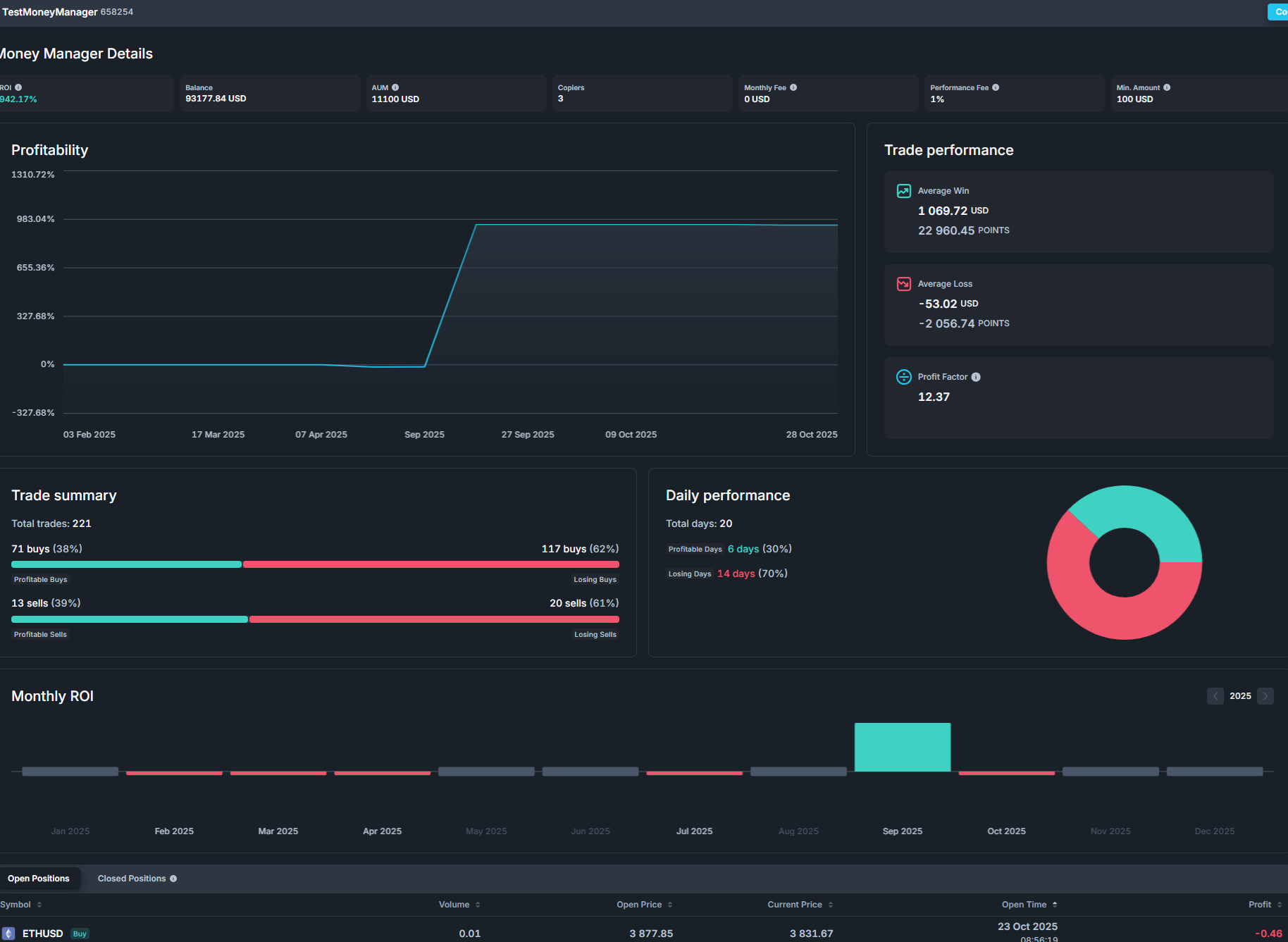
Open the Copy Trading tab to see the list of Money Managers. Click Details on any Money Manager to see their full trading statistics before you put money in.

The details page includes:
- Profitability: how the Money Manager’s return has changed over time.
- Trade performance: average winning trade, average losing trade and profit factor.
- Trade summary: how many long and short trades were won or lost.
- Daily performance: the number of winning and losing trading days.
- Monthly ROI: the return for each month.
- Open and closed positions: the trades behind the numbers.
Start copying a Money Manager
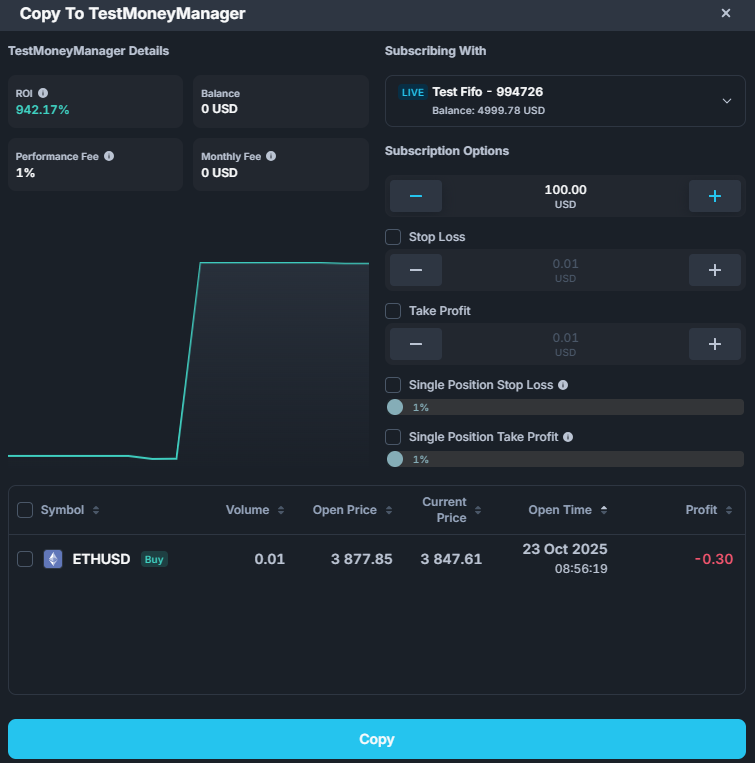
1. Go to Copy Trading, pick a Money Manager and click Copy.

2. Under Subscribing With, choose the trading account you want to copy with.
3. Enter your Subscription Amount. This amount decides how big your copied trades are compared with the Money Manager’s trades. See Copy ratio below.
4. If you want, set limits to protect your subscription:
- Stop Loss: your subscription ends automatically if your loss on it reaches this amount.
- Take Profit: your subscription ends automatically once your profit on it reaches this amount.
- Single Position Stop Loss and Single Position Take Profit: a limit applied to each copied position on its own.
5. The window also lists the Money Manager’s positions that are open right now. Tick any you want to copy straight away. They open on your account at the current market price.
6. Click Copy to start your subscription.
Change your subscription
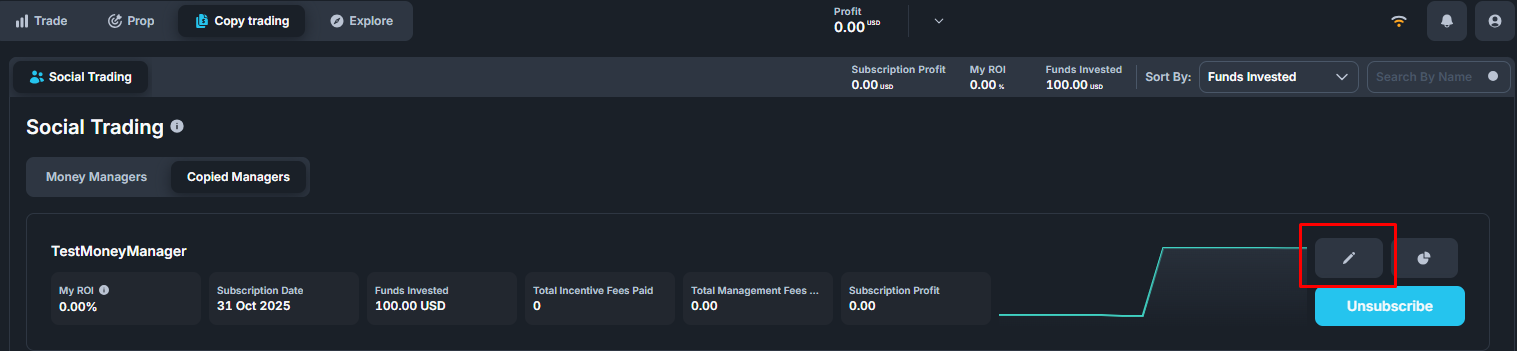
To change a subscription to a Money Manager you already copy, open Copy Trading, go to Copied Managers and click the Edit (pencil) button on that Money Manager.
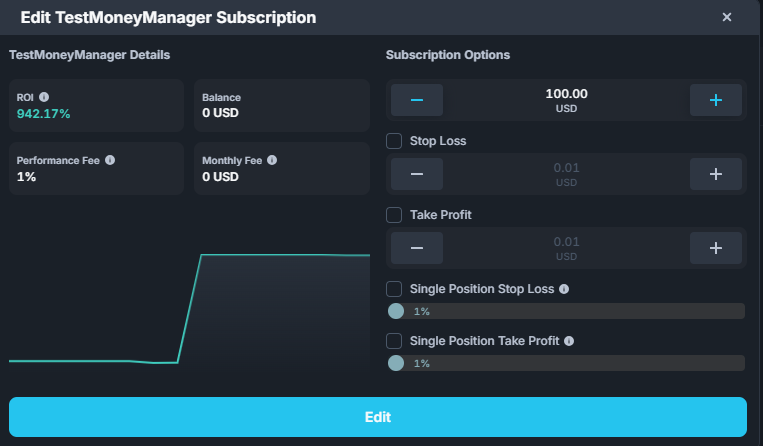
You can change your subscription amount, Stop Loss, Take Profit and single-position limits. Click Edit to save.
Stop copying a Money Manager
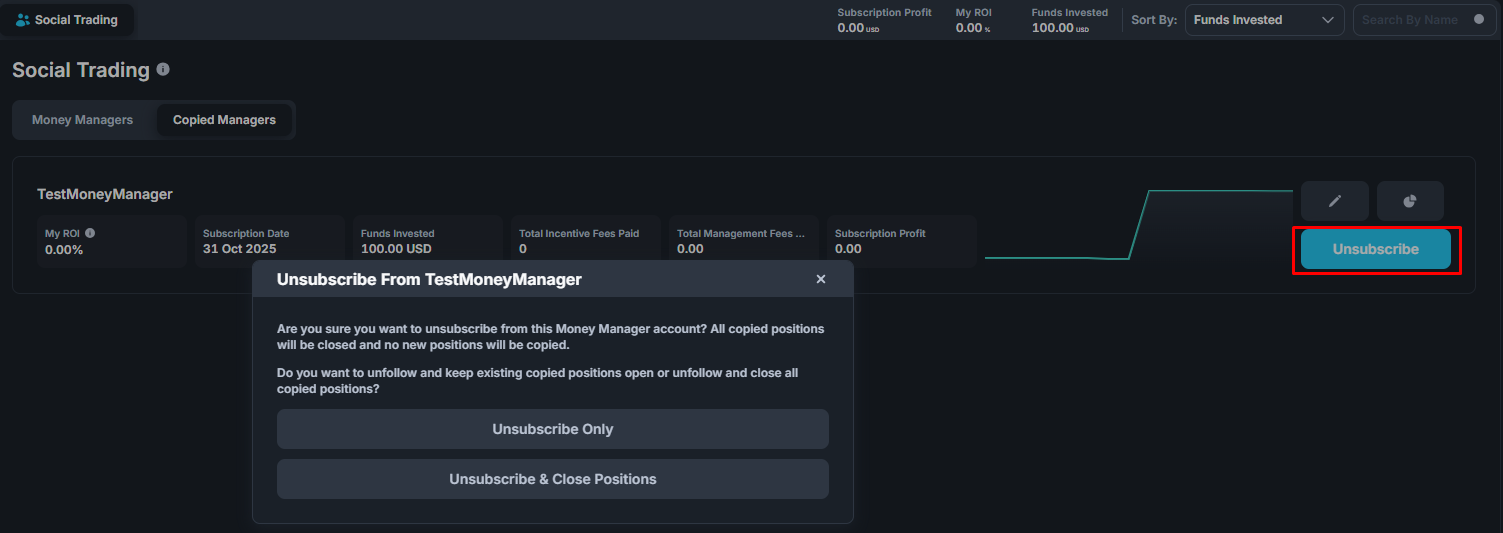
Go to Copied Managers and click Unsubscribe on the Money Manager. You can then choose one of two options:
- Unsubscribe Only: new trades are no longer copied. Positions that were already copied stay open on your account, and you can manage or close them yourself.
- Unsubscribe & Close Positions: copying stops and every position copied from this Money Manager is closed.
Copy ratio: how big your copied trades are
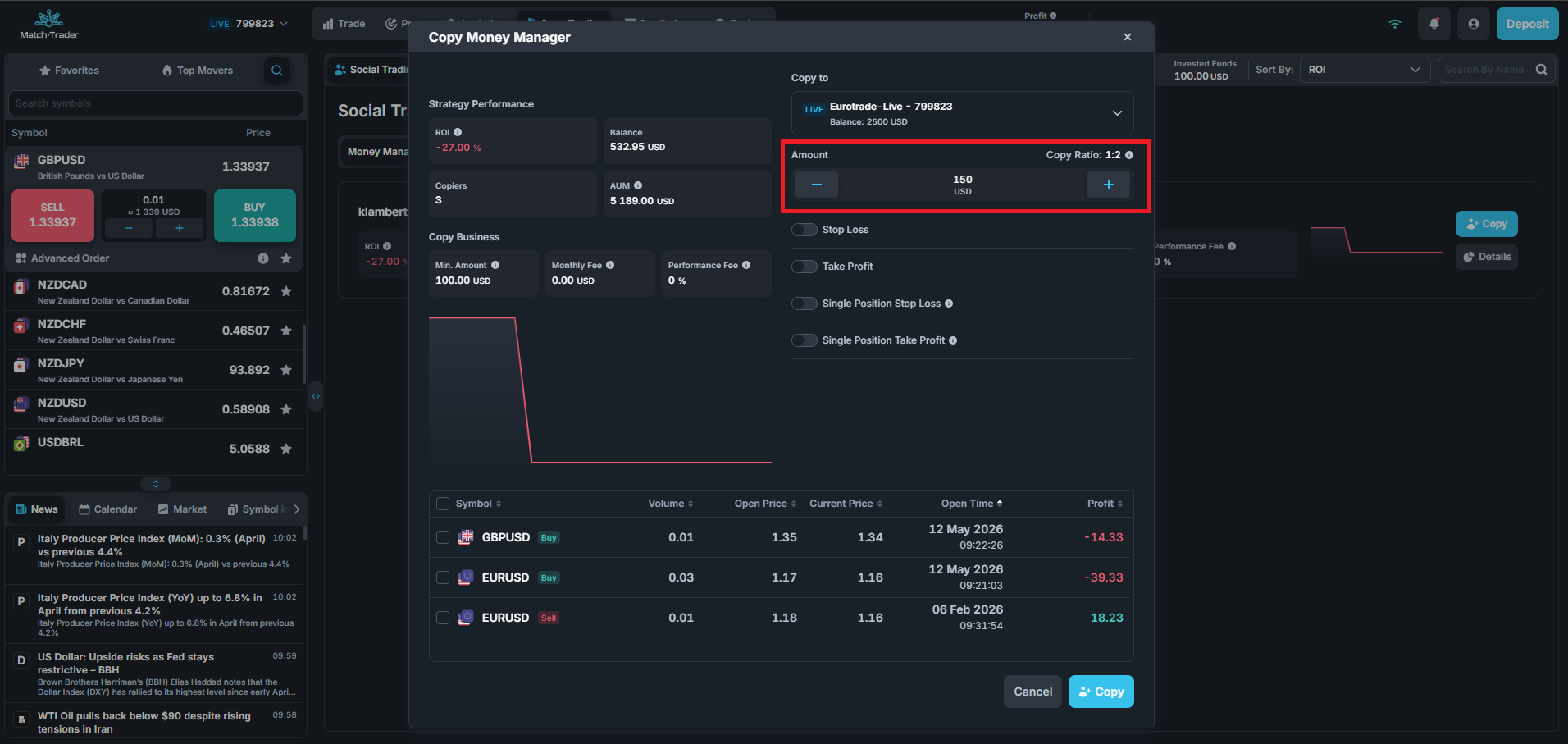
When you enter or change your Subscription Amount, a Copy Ratio appears next to it and updates as you type. It shows how your money compares with the Money Manager’s, and so how large your copied trades will be.
The ratio is written as 1:X: for every X lots the Money Manager trades, 1 lot is copied to your account. For example, at 1:20, a 20-lot trade by the Money Manager opens a 1-lot trade on your account.
How the ratio is worked out:
| Where you see it | Calculation |
|---|---|
| Copy window, when you first subscribe | Subscription Amount ÷ Money Manager’s equity |
| Edit Subscription window | The same calculation, updated each time you change the amount |
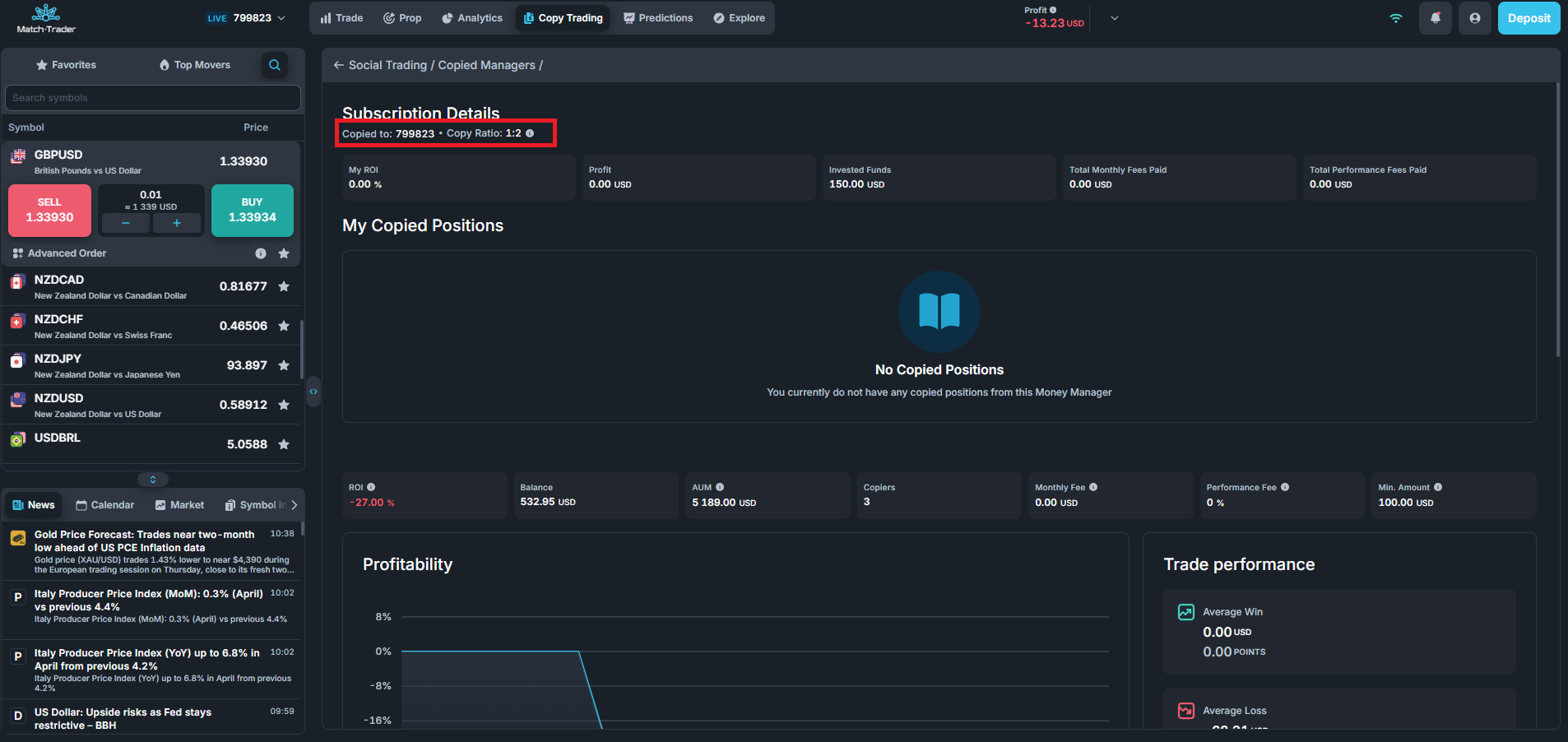
| Subscription Details in Copied Managers | (Subscription Amount + your subscription profit) ÷ Money Manager’s equity, so it reflects the profit or loss on your closed copied trades |
The Money Manager’s equity includes their open positions. The ratio is rounded to the nearest whole number.
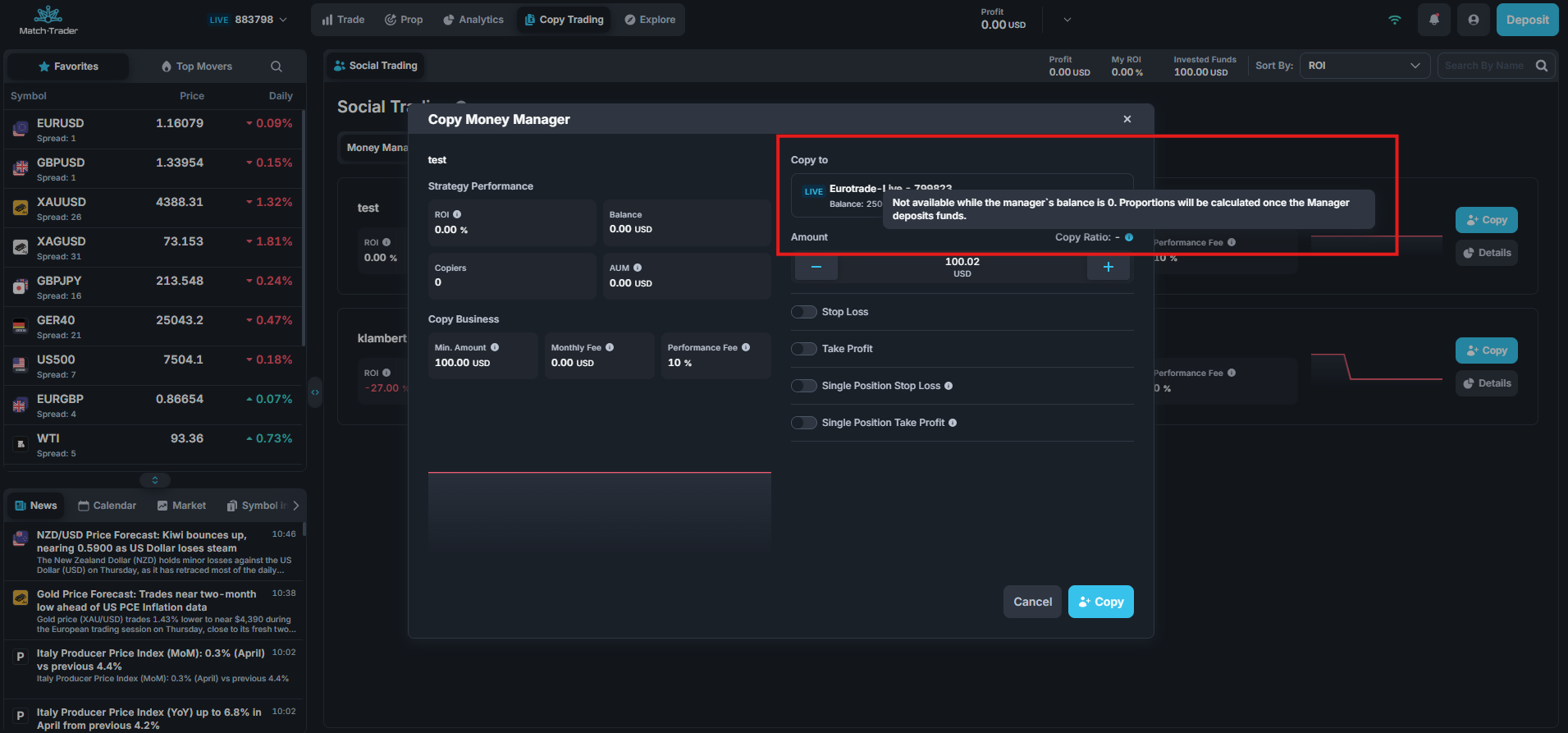
If the Money Manager’s balance is 0: the ratio can’t be calculated, so a note appears in its place explaining that it will show once the Money Manager deposits funds. You can’t subscribe to that Money Manager until their balance is above 0.
2. Becoming a Money Manager
As a Money Manager, you publish your trading strategy so other traders can copy it, and you earn fees from the traders who copy you.
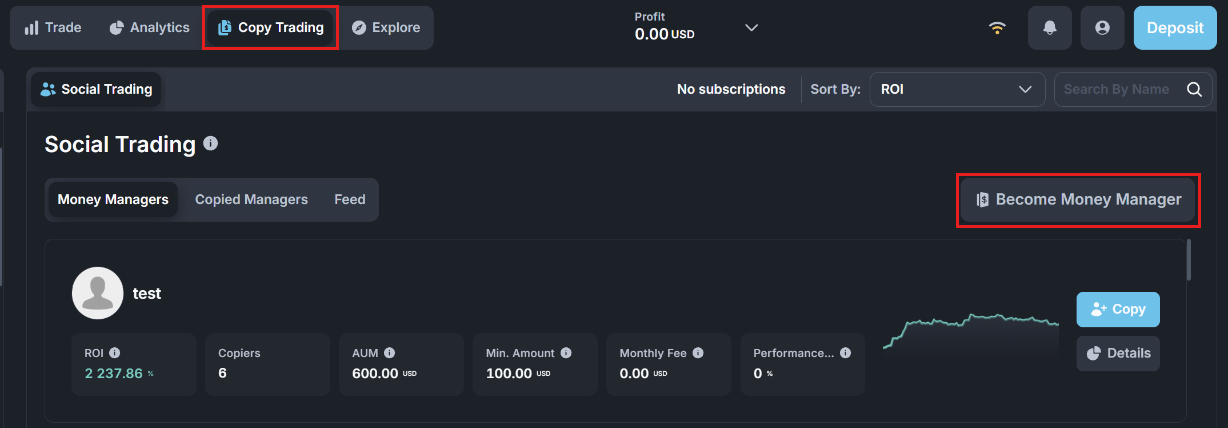
1. Open the Copy Trading tab and click Become Money Manager.
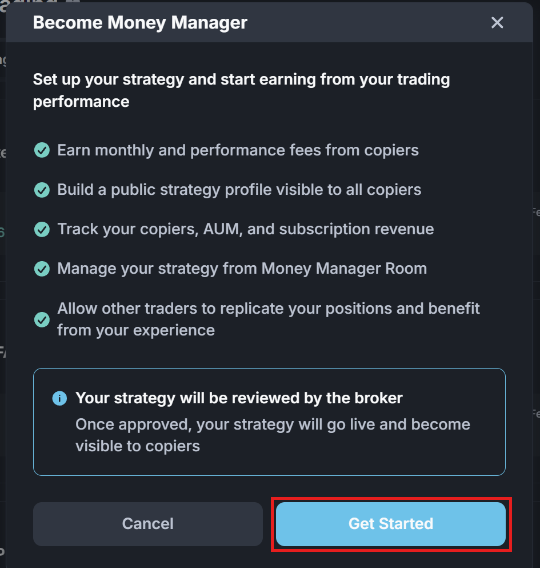
2. A window explains what you get as a Money Manager: monthly and performance fees from your copiers, a public strategy profile, tracking of your copiers, AUM and subscription revenue, and the Money Manager Room to manage your strategy. Click Get Started.
Your strategy is reviewed by Fortuno Markets before it goes live. Once it is approved, copiers can see and copy it.
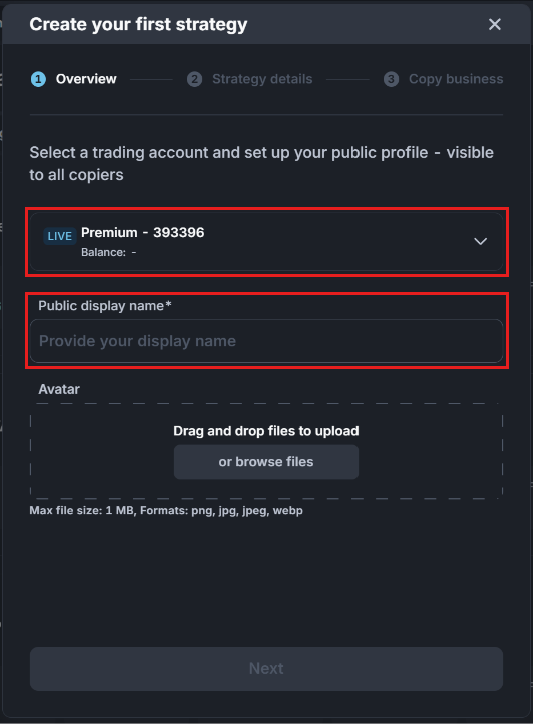
3. Overview: choose the trading account you will trade your strategy on, and enter a Public display name. This name is shown to all copiers. You can also upload an avatar (PNG, JPG, JPEG or WEBP, up to 1 MB). Click Next.
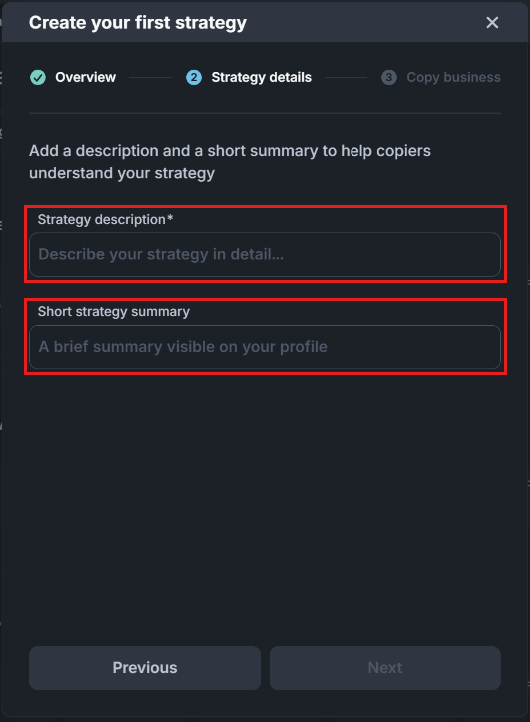
4. Strategy details: write a Strategy description that explains how you trade. You can also add a Short strategy summary, which appears on your profile. Click Next.
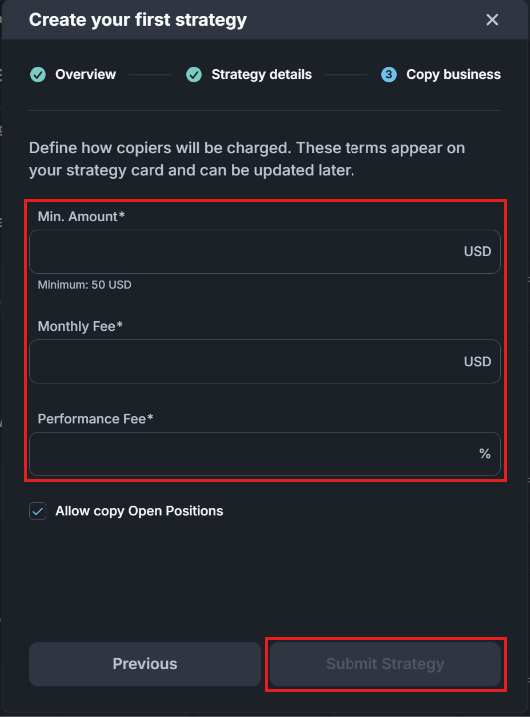
5. Copy business: set the terms for your copiers. These terms appear on your strategy card, and you can change them later.
- Min. Amount: the smallest amount a trader needs to copy you. The form shows the lowest value allowed.
- Monthly Fee (subscription fee): a fixed commission in USD that you receive from each copier, regardless of performance. It is charged every 30 days, and the first charge is made as soon as the copier subscribes. For example, entering 12 means copiers pay 12 USD every 30 days.
⚠️ Important: as of the latest update, the subscription fee is no longer refunded when a copier unsubscribes before the 30-day period ends. If a copier does not have enough funds to cover the subscription fee, they are detached automatically. - Performance Fee: the percentage of copiers’ profit that you receive, also called the incentive fee. See Incentive Fee for how it is calculated.
- Allow copy Open Positions: when ticked, new copiers can also copy the positions you already have open.
Click Submit Strategy.
6. Your strategy is sent to Fortuno Markets for review. Once it is approved, it goes live in the Money Managers list and traders can start copying you.
3. Incentive Fee
The incentive fee, also called the performance fee, is the commission a Money Manager receives for profitable trades. It is a percentage of the profit made, set by the Money Manager and shown on their strategy card. The High Water Mark (HWM) rule applies, so the same profit is never charged twice.
How the fee is calculated
- Only net profit is charged. If there is no overall profit, there is no fee.
- Open losses are subtracted. When the Money Manager closes a winning trade, any losses on trades that are still open are subtracted from that profit first.
- Open profits are not counted. Profit on a trade that is still open is not charged until the trade is closed.
- High Water Mark. The HWM is the highest profit a fee has already been paid on. A fee is only charged on new profit above the HWM. After a loss, the fee starts again only once the profit climbs back above the HWM.
All the examples below use an incentive fee of 10%.
Example 1: The High Water Mark rule
This example follows a client’s profit over three steps.
| Step | What happens | Total profit | HWM before | New profit | Fee (10%) |
|---|---|---|---|---|---|
| 1 | The client makes a profit of 10 USD | 10 USD | 0 USD | 10 USD | 1.00 USD |
| 2 | The client then loses 5 USD | 5 USD | 10 USD | None | No fee |
| 3 | The client makes another 10 USD profit | 15 USD | 10 USD | 5 USD | 0.50 USD |
- Step 1: the client makes 10 USD profit and pays a 1 USD fee (10% of 10 USD). The HWM is now 10 USD, because a fee has been paid on 10 USD of profit.
- Step 2: the client loses 5 USD. Their total profit falls to 5 USD, which is below the HWM, so there is no new profit and no fee.
- Step 3: the client makes another 10 USD. Total profit is now 10 − 5 + 10 = 15 USD. A fee was already paid on the first 10 USD (the HWM), so only 15 − 10 = 5 USD is new profit. The fee is 10% of 5 USD = 0.50 USD, and the HWM rises to 15 USD.
Without the HWM rule, the client would have paid a fee on the second 10 USD profit as well, even though 5 USD of it only won back an earlier loss.
Example 2: Closing a winning trade while a losing trade is still open
The Money Manager has two trades:
- Trade A: +500 USD profit
- Trade B: −400 USD loss, still open
What happens: the Money Manager closes Trade A at +500 USD and keeps Trade B open.
Calculation:
- Closed profit: 500 USD
- Open loss to subtract: 400 USD
- Profit the fee is charged on: 500 − 400 = 100 USD
- Incentive fee: 10% × 100 USD = 10 USD
Why: Trade B could still close at a loss, so the fee is only charged on the 100 USD that is left after covering it. The HWM is now 100 USD.
Example 3: Closing a winning trade while another winning trade is still open
The Money Manager has two trades:
- Trade A: +500 USD profit
- Trade B: +400 USD profit, still open
What happens: the Money Manager closes Trade A at +500 USD and keeps Trade B open.
Calculation:
- Closed profit: 500 USD
- Open loss to subtract: none, because Trade B is in profit
- Profit the fee is charged on: 500 USD (Trade B’s 400 USD is not counted yet)
- Incentive fee: 10% × 500 USD = 50 USD
Why: open profit is not charged, because it is not final. Trade B’s profit will only be charged once it is closed. The HWM is now 500 USD.
Example 4: Open losses are bigger than the closed profit
The Money Manager has three trades:
- Trade A: +500 USD profit
- Trade B: −400 USD loss, still open
- Trade C: −200 USD loss, still open
What happens: the Money Manager closes Trade A at +500 USD and keeps Trades B and C open.
Calculation:
- Closed profit: 500 USD
- Open losses to subtract: 400 + 200 = 600 USD
- Result: 500 − 600 = −100 USD, so there is no net profit
- Incentive fee: no fee
Why: the open losses are bigger than the profit taken, so overall the account is not in profit.
Example 5: A losing trade recovers and is closed in profit
The Money Manager has two trades:
- Trade A: +500 USD profit
- Trade B: −400 USD loss, still open
Step 1: the Money Manager closes Trade A at +500 USD.
- Profit the fee is charged on: 500 − 400 (open loss) = 100 USD
- Incentive fee: 10% × 100 USD = 10 USD
- HWM is now 100 USD
Step 2: Trade B recovers from −400 USD to +400 USD, and the Money Manager closes it.
- Total profit is now 500 + 400 = 900 USD, with no open losses left
- A fee was already paid on 100 USD (the HWM), so the new profit is 900 − 100 = 800 USD. This is the 400 USD open loss that was won back plus the 400 USD profit on Trade B
- Incentive fee: 10% × 800 USD = 80 USD
- HWM is now 900 USD
In total: 10 + 80 = 90 USD, which is 10% of the full 900 USD profit. The fee was charged once on each part of the profit, never twice.
Example 6: A loss is closed first, then a losing trade recovers
The Money Manager has two trades:
- Trade A: −200 USD loss
- Trade B: −400 USD loss, still open
Step 1: the Money Manager closes Trade A at −200 USD.
- Closing a losing trade creates no profit, so there is no fee. Open trades are not checked at this point.
- Total closed result: −200 USD
Step 2: Trade B recovers from −400 USD to +400 USD, and the Money Manager closes it.
- Total closed result: −200 + 400 = 200 USD net profit
- No fee has been paid yet (HWM is 0 USD), so all 200 USD is new profit
- Incentive fee: 10% × 200 USD = 20 USD
Why: the 200 USD loss on Trade A is set against Trade B’s profit, so the fee is only charged on the 200 USD actually gained overall.
Summary
| Example | Fee charged on | Fee (10%) |
|---|---|---|
| 1. High Water Mark | 10 USD, then 5 USD | 1.00 USD, then 0.50 USD |
| 2. Open trade is losing | 100 USD | 10 USD |
| 3. Open trade is winning | 500 USD | 50 USD |
| 4. Open losses bigger than profit | Nothing | No fee |
| 5. Losing trade recovers | 100 USD, then 800 USD | 10 USD, then 80 USD |
| 6. Loss closed first | 200 USD | 20 USD |
Copy trading carries risk. A Money Manager’s past results do not guarantee future returns, and you can lose the money you put into a subscription.